
Last reviewed: October 23, 2026. Steps and error messages come from Kroger’s Digital Account FAQs and its account sign-up page.
Kroger Rewards is free to join. You need an email address, and either a Shopper’s Card number or a 10-digit Alt ID that you create during sign-up.
Most people use their mobile number as the Alt ID. Once it’s set up, you give that number at the register or the pump instead of carrying a card, and every purchase earns points and member prices.
This guide covers the sign-up steps, how the Alt ID works, how to link a household, and what each common error message means.
What’s the difference between a digital account, a Shopper’s Card and an Alt ID?
These three get mixed up a lot, but they’re connected parts of the same membership. Kroger’s FAQ says your digital account, Shopper’s Card and Alt ID “are connected.”
| Part | What it is | Where you use it |
|---|---|---|
| Digital account | Your online login, using your email and a password | Kroger.com and the Kroger app |
| Shopper’s Card | The physical plastic card, sometimes called the Kroger Plus Card | In store and at the pump |
| Alt ID | A 10-digit number, usually your phone number, that works like a virtual card | In store, at the pump and online |
You don’t need all three. Many shoppers have a digital account and an Alt ID and never get a plastic card.
What you do need is for every purchase to be tied to one of them. Points and personalized offers only land in your account when the register knows who you are.
What do you need to sign up?
Kroger’s FAQ lists only a few things. Have them ready before you start so you can finish in one go.
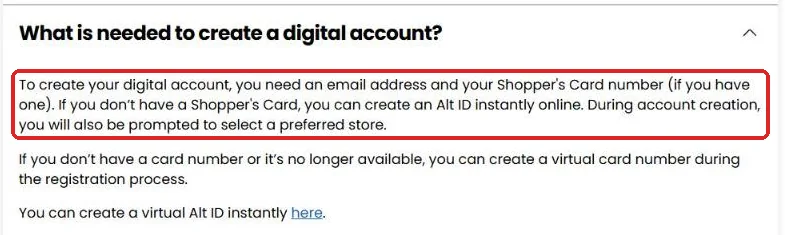
- An email address, which becomes your username
- Your Shopper’s Card number, if you have one
- A 10-digit number for your Alt ID, if you don’t have a card
- Your preferred store, which you’ll pick during sign-up
Kroger doesn’t charge anything for the basic membership. Its June 2026 press release says joining is free at Kroger.com.
How do you create a Kroger digital account?
Sign-up starts at Kroger.com or in the Kroger app. The web version opens a six-step form that begins with your email address.
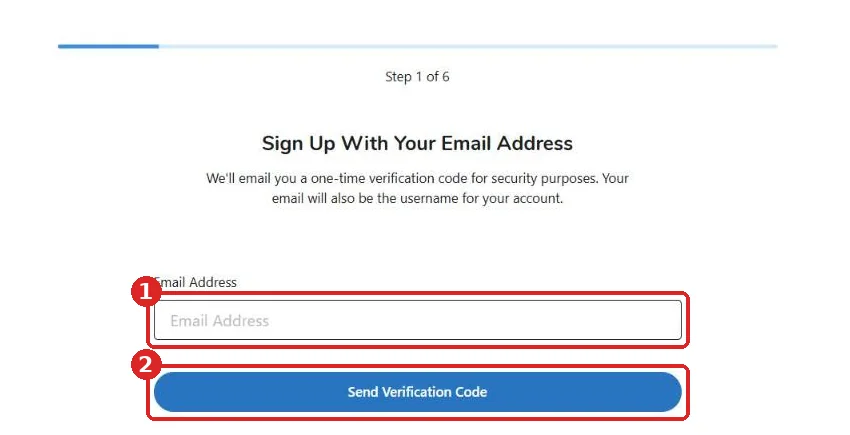
- Enter your email address. Kroger says this email “will also be the username for your account.”
- Request a verification code. Select “Send Verification Code” and Kroger emails you a one-time code for security.
- Enter the code from your inbox to confirm the email is yours.
- Add your card or create an Alt ID. Enter your Shopper’s Card number, or choose to create a new Alt ID.
- Pick your preferred store. Kroger’s FAQ says you’ll be prompted for this during account creation, so choose the store you visit most.
- Finish the remaining steps and confirm your account.
We only checked the first screen, because going further means creating a real account. The exact order of steps 3 to 6 may differ slightly, but the items Kroger asks for match its FAQ.
Choosing a password
Kroger’s FAQ says passwords need to be “at least 6 digits long and contain at least 1 number.” In practice that means at least six characters, with at least one number among them.
Use something longer than the minimum. Your account holds your shopping history, saved payment details for online orders, and possibly pharmacy information.
If the confirmation email doesn’t arrive
Kroger warns that some providers, Yahoo among them, can take up to 24 hours to deliver its confirmation emails. Check your spam or promotions folder first.
If the link in the email won’t open, Kroger suggests it’s usually your email software blocking links. Try opening the email in your provider’s website instead of a desktop email program.
How do you set up a Kroger Alt ID?
An Alt ID is a 10-digit number that works in place of a card number. Kroger also calls it a virtual card number or Alternate ID.
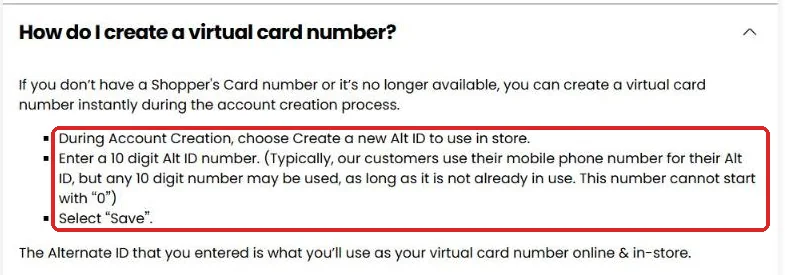
- During account creation, choose Create a new Alt ID to use in store.
- Enter a 10-digit number.
- Select Save.
The number has two rules. It can’t already be in use by someone else, and it can’t start with “0.”
Kroger says most customers use their mobile phone number, but any 10-digit number works. If your phone number is taken, perhaps by an old account or a family member, you can choose a different number you’ll remember.
Where can you use your Alt ID?
Kroger says the Alt ID is “what you’ll use as your virtual card number online & in-store.” At checkout, you type it on the card reader keypad or tell the cashier.
At Kroger fuel centers, the Points FAQ says you can “enter your Alt ID (phone number) or insert your Rewards card” at the pump keypad. That’s how you redeem points without the plastic card.
Phone number or random number?
A phone number is easy to remember, which is why most people pick it. The downside is that you’re saying it out loud at the register.
If that bothers you, choose a different 10-digit number you can remember, like an old landline. Kroger’s FAQ only requires that it’s unused and doesn’t start with zero.
What do you get as a Kroger Rewards member?
Kroger’s digital account FAQ lists what membership gives you. The main ones are below.
- Digital coupons you can load to your account
- Online grocery ordering for Pickup or Delivery
- Points on most purchases, viewable in your account
- The weekly circular and personalized offers by email, if you sign up for them
- A shopping list that syncs between devices
- Prescription management through the pharmacy account
There’s also a fuel perk. Kroger’s Points FAQ says members get 3¢ off per gallon at participating fuel locations, even without redeeming points.
Points themselves are the biggest benefit. Our Kroger Points guide explains how you earn them and what 100 points are worth.
Can you link accounts with others in your household?
Yes. Kroger offers household account linking, which combines coupons, points and rewards across accounts in one home.
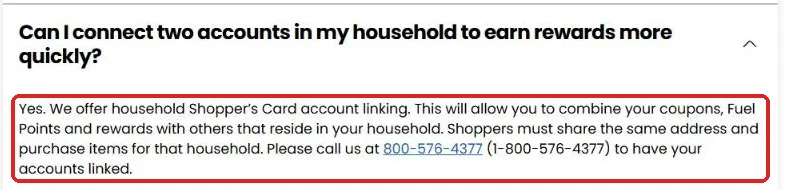
Kroger lists two conditions. Everyone must share the same address, and they must be buying items for that household.
You can’t link accounts online. Kroger’s FAQ says to call 1-800-576-4377 to have accounts linked.
The same number handles un-linking. If someone moves out, call Kroger to have their account disconnected from the household.
Linking helps couples and families who shop separately. Two people earning 400 points each can pool them into 800, reaching a bigger fuel discount before the points expire.
Why won’t Kroger accept my card or Alt ID?
Kroger’s troubleshooting FAQ lists the error messages people see during sign-up. Here’s what each one means and what to do.
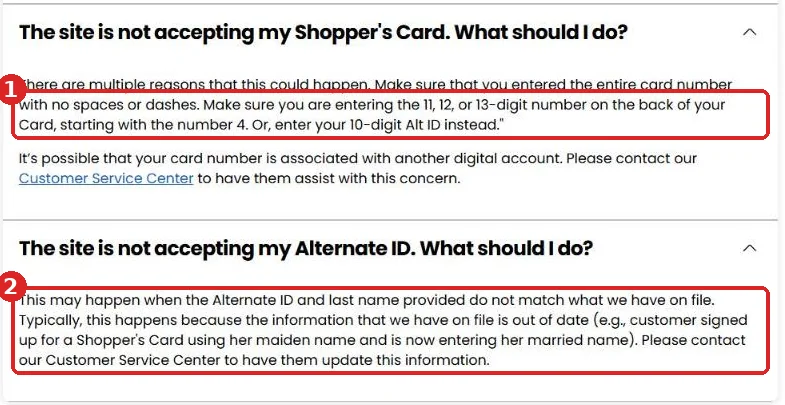
| Error message | What it means | What to do |
|---|---|---|
| “The Card number entered is not a valid Shopper’s Card number” | The number was mistyped or has spaces | Re-enter the full number with no spaces or symbols |
| “This Card number has been associated with another account already” | An old email or a family member registered the card first | Contact Kroger’s website support or Customer Service |
| “We were not able to find your Shopper’s Card” | The last name or ZIP code on file is out of date | Contact web support to update your details |
| “The loyalty card number you entered has not been used in any store yet” | A brand-new card hasn’t been scanned, or the preferred store is wrong | Use the card in store once, or check your store choice |
| “Email address is already registered” | You made an account before | Use “Forgot My Password” instead of creating a new one |
| Alt ID not accepted | The Alt ID and last name don’t match the records | Call Customer Service to update your name |
How long is a Kroger card number?
Kroger’s own pages give two answers. One troubleshooting answer says the card number is 12 digits long. Another says to enter “the 11, 12, or 13-digit number on the back of your Card, starting with the number 4.”
Go with what’s printed on your card, and type every digit without spaces or dashes. If the card still fails, Kroger suggests entering your 10-digit Alt ID instead.
Why does a name change cause problems?
Kroger checks your last name against the name on file. If you signed up years ago under a different name, the system may reject your Alt ID.
Kroger’s FAQ gives the example of a customer who signed up under her maiden name and now enters her married name. Customer Service can update the record for you.
Getting emails but can’t log in?
This one surprises people. Kroger says you can receive its emails without having a digital account, if you gave your email on a paper card application.
In that case, there’s no account to log in to yet. Create a new digital account with the same email and your card number.
How do you reset a forgotten password?
Select “Forgot my Password” under the sign-in fields. Enter the email linked to your account, and Kroger sends a password reset email.
If you see “The email address entered is not registered in our system,” there’s no account under that email. You may have used a different address, or you’ll need to create a new account.
To change other settings later, Kroger’s steps are: Sign In, then My Account, then Edit next to the setting you want to change.
What happens if you delete your Kroger account?
Deleting your digital account removes your ability to sign in to Kroger.com and the Kroger app. It doesn’t wipe everything, though.
| Removed when you delete | Kept on your card account |
|---|---|
| My Pharmacy account | Kroger Plus Card |
| Email preferences | Fuel Points |
| My Lists | Purchase history |
| Items in your cart | Clipped digital coupons and coupon credits |
| My Recipes | Store credit, Community Rewards and Boost benefits |
The kept items stay attached to your card, and you can reach them through Customer Service or the store’s customer service desk.
Kroger also notes that deleting your account “is not a ‘Do Not Sell My Personal Information’ privacy request.” That’s a separate request you’d make through its privacy options.
Sign-up mistakes that cause problems later
Most account headaches start at sign-up. These are the ones Kroger’s own troubleshooting pages point to, and how to avoid them.
| Mistake | What goes wrong | How to avoid it |
|---|---|---|
| Creating a second account with a new email | Your card is already tied to the old account, so it’s rejected | Try “Forgot My Password” with any old emails first |
| Registering a brand-new card before using it | Kroger says the card must be scanned in a store first | Use the card on one shopping trip, then register it |
| Using a different last name than on file | The card or Alt ID check fails | Call Customer Service to update your name |
| Typing the card number with spaces or dashes | “Not a valid Shopper’s Card number” | Enter digits only |
| Picking an Alt ID someone else uses | The number is refused | Choose another 10-digit number that doesn’t start with 0 |
| Choosing the wrong preferred store | Kroger says this can cause a card error during registration | Pick the store where you actually shop |
Already have an old card in a drawer?
Use it rather than starting fresh. An old card may already have years of purchase history attached, and Kroger’s FAQ says a card can only be associated with one digital account.
If you can’t remember which email you used, Customer Service can look it up. That’s quicker than fighting the “already associated” error later.
What to do in your first week
A few small steps right after sign-up make sure you start earning straight away.
- Write your Alt ID somewhere you’ll remember, or save it in your phone’s notes.
- On your next trip, give the Alt ID at checkout and check that the receipt shows points earned.
- Sign in to the app and confirm the points appear in your balance.
- Browse digital coupons for your next shop.
- If someone else in your home shops at Kroger, call to link your household accounts.
If the first receipt shows no points, check the earning rules in our Kroger Points guide before calling. Alcohol, tobacco and some gift cards don’t earn.
Tips once you’re signed up
Getting the account is step one. These habits help you get value out of it.
- Give your Alt ID on every purchase, including gas, so nothing goes unrecorded.
- Load digital coupons before you shop. They’re tied to your account, not to paper.
- Check your points balance near the end of each month, since points expire at the end of the following month.
- Take the receipt survey for a 50-point bonus, limited to one per 7 days. Our Kroger feedback survey guide shows how.
- Consider Kroger Boost only if you’d use its delivery and 2X points perks. Our Kroger Boost guide breaks down the cost.
Common questions about Kroger Rewards sign-up
Is Kroger Rewards free?
Yes. The basic membership costs nothing. Kroger Boost is a separate paid membership with extra perks.
Can I use my phone number instead of a card?
Yes. Set your phone number as your Alt ID during sign-up, then enter it at checkout or the pump.
Do I need a card from the store first?
No. If you don’t have a Shopper’s Card, you can create an Alt ID online during account creation.
Can two people use the same Alt ID?
Each Alt ID must be unique. To combine rewards, link separate accounts in the same household by calling Kroger.
Does a Kroger account work at Ralphs, Fred Meyer and King Soopers?
Kroger says points work across its family of brands. Each brand has its own website, but your rewards travel with you.
Who do I call for sign-up problems?
Kroger Customer Service is at 1-800-KRO-GERS (1-800-576-4377). See our Kroger customer service guide for hours and other contact options.
KrogerFeedbacks.us is an independent guide and is not affiliated with The Kroger Co. Never share your account password or verification code with anyone, including people claiming to be from Kroger.