Kroger Feedback Survey: How to Take It and Get 50 Bonus Points
The Kroger feedback survey lives at kroger.com/feedback. Finish it with details from your receipt and you can get a 50-point bonus, limited to one bonus every 7 days.
This guide walks through every screen with real screenshots taken from the live survey. It also covers what the points are worth, common errors, and how to avoid fake survey pages.
Please note: KrogerFeedbacks.us is an independent informational website. We are not owned by, affiliated with, or endorsed by The Kroger Co. The survey itself is only taken on Kroger’s own website.
Kroger Feedback Survey at a Glance
Here are the key facts in one place. Each one is explained in more detail further down the page.
| Detail | What You Need to Know |
|---|---|
| Official survey address | kroger.com/feedback (printed on your receipt) |
| Who runs it | Kroger, on a Qualtrics survey form |
| Visits covered | In-store and pharmacy visits |
| Reward | 50-point survey bonus |
| Bonus limit | One survey bonus per 7 days |
| What you need | Your receipt: Entry ID (or store phone number), visit date and visit time |
| Languages | English and Español (América Latina) |
| Where points go | Your Kroger Rewards account |
What Is the Kroger Feedback Survey?
It is Kroger’s official customer satisfaction survey. The form’s title is “Kroger Feedback—In Store or Pharmacy,” so it covers both a regular shopping trip and a visit to the pharmacy counter.
You get an invitation to it at the bottom of your receipt. It usually reads “Earn 50 Fuel Points by giving us feedback,” followed by the web address and the codes you need.
Some shoppers call it the fuel points survey, because that’s the reward printed on the receipt. It’s the same survey either way.
Why Does Kroger Ask for Your Feedback?
A store chain this big can’t watch every checkout lane. Customer surveys show managers what shoppers notice, like long lines, empty shelves, or a helpful cashier who made the trip easier.
The survey form says the receipt details are needed to “link your visit to a specific store.” So your answers reach the location you actually visited, not a general inbox.
For you, it’s a quick way to be heard and pick up a few extra points. Specific, honest answers are the most useful, whether your visit was good or bad.
How Does the Kroger Feedback Survey Work?
The flow is simple. You shop, keep your receipt, open kroger.com/feedback, and enter the details from the receipt so the survey knows which visit you’re rating.
Then you answer questions about that trip and finish the survey. The bonus goes to the Kroger Rewards account linked to your purchase, and you can use it on fuel or groceries.
Is Krogerfeedback.com Still the Right Website?
Many websites and old receipts still mention www.krogerfeedback.com. When we tested it in October 2026, that address did not load at all. The browser showed a “refused to connect” error.
Current Kroger receipts point to kroger.com/feedback. That address forwards you to Kroger’s survey form, which is hosted by Qualtrics, a well-known survey company.
So if an old link lands you on a dead page, don’t worry. Just type the address printed on your own receipt.
Why Does the Survey Address Look Different After You Click?
After you open kroger.com/feedback, the address bar changes to a long link that starts with 8451cx.az1.qualtrics.com. This is normal.
Kroger uses Qualtrics to run the form. The page still shows Kroger’s branding and a “Kroger Privacy Policy” link at the bottom. In the bottom corner you’ll also see “Powered by Qualtrics.”
How Can You Spot a Fake Kroger Survey Page?
Because the survey offers a reward, copycat pages try to use it as bait. Some promise cash prizes or “free” gift cards to get your personal details.
Leave the page if you see any of these warning signs:
- It asks for your credit card, bank details, Social Security number, or account password.
- It reached you as a random text message, email, or social media ad instead of from your receipt.
- The web address has a spelling mistake or extra words added to the Kroger name.
- It promises big cash prizes for answering a few questions.
- It asks you to pay a fee or shipping charge to claim a reward.
The real survey only asks about your visit and your receipt details. The safest habit is to type kroger.com/feedback yourself instead of clicking links.
What Do You Need Before You Start the Survey?
Get these things ready before you open the page. You’ll finish faster and won’t have to start over halfway through.
| Item | Why You Need It |
|---|---|
| A recent Kroger receipt | It holds the survey invitation and every detail the form asks for. |
| Entry ID | Links your answers to the exact store and visit. |
| Store phone number | Used instead of the Entry ID if your receipt doesn’t have one. |
| Date and time of your visit | Printed on the receipt; the form asks for both. |
| Kroger Rewards account | The points go into a Rewards account, which is free to join at Kroger.com. |
| Phone, tablet or computer | The survey works in any modern web browser. |
Where Is the Entry ID on Your Kroger Receipt?
Look near the bottom of the receipt for a block framed by rows of asterisks (****). Inside it you’ll see the survey message, the web address, the date, the time and the Entry ID.
The Entry ID is a long string of numbers split into groups by dashes. The survey gives you six boxes to type it in, one group per box.
The sample receipts on the survey page show two layouts. The English page shows the format 000-000-000-000-000-000. The Spanish page shows a different sample, 014-695-15-858-88-28. Copy the groups exactly as your receipt shows them.
What Does Each Line in the Survey Section Mean?
The survey block on your receipt is small, but every line has a job. Here’s how to read it, using the layout of the sample receipt on the survey page.
| Receipt Line | What It Means |
|---|---|
| Row of asterisks (****) | Marks the start and end of the survey section |
| “Earn 50 Fuel Points by giving us feedback” | The invitation and the reward |
| “Go to kroger.com/feedback” | The only address you should use |
| Date | The day of your visit, entered in the Month/Day/Year menus |
| Time | The time of your visit, entered in the Hour/Minute/AM-PM menus |
| Entry ID | The code you type into the six boxes |
The store phone number isn’t in this block. It’s printed at the top of the receipt with the store’s name and address.
How Long Do You Have to Take the Survey?
Don’t wait too long. The sample receipt on the Spanish version of the survey says to go to kroger.com/feedback “in the next 7 days” and enter your details.
Your own receipt is the final word, since the wording can change. As a simple rule, take the survey within a week of shopping. The survey form only lets you pick dates from 2023 onward.
Is There a Kroger Feedback Login?
No. The survey itself has no login page, username, or password. You go straight from kroger.com/feedback to the receipt questions.
If you’re looking for a place to sign in, what you need is your Kroger Rewards account. That’s where the points show up after you earn them.
If you don’t have an account yet, you can sign up for free at Kroger.com or in the Kroger app. Use the same Rewards card or phone number (Alt ID) when you shop so your purchases and points stay together.
How Do You Sign Up for Kroger Rewards Online?
Joining is free. Go to Kroger.com or open the Kroger app, choose the option to create an account, and follow the prompts to set up your digital account.
Then connect a Rewards card, or set up your phone number as an Alt ID. Give that card or number at checkout every time so each purchase, and its points, lands in the same account.
If you shopped without your card, the purchase may not be linked to you. Your points are tied to the account used at checkout, not to who fills in the survey.
How Do You Take the Kroger Feedback Survey Step by Step?
The steps below match the live survey form as of October 2026. The screenshots show the real screens, with red boxes marking what to look at.
Step 1: Open kroger.com/feedback and Choose a Language
Type kroger.com/feedback into your browser. The page opens with a grocery banner, a language menu, and a welcome message asking you to fill in details from your receipt.
Use the menu on the right (1) to pick English or Español (América Latina). Just below, the page states the bonus limit (2): “Limit one 50 Fuel Points Survey Bonus per 7 days.”
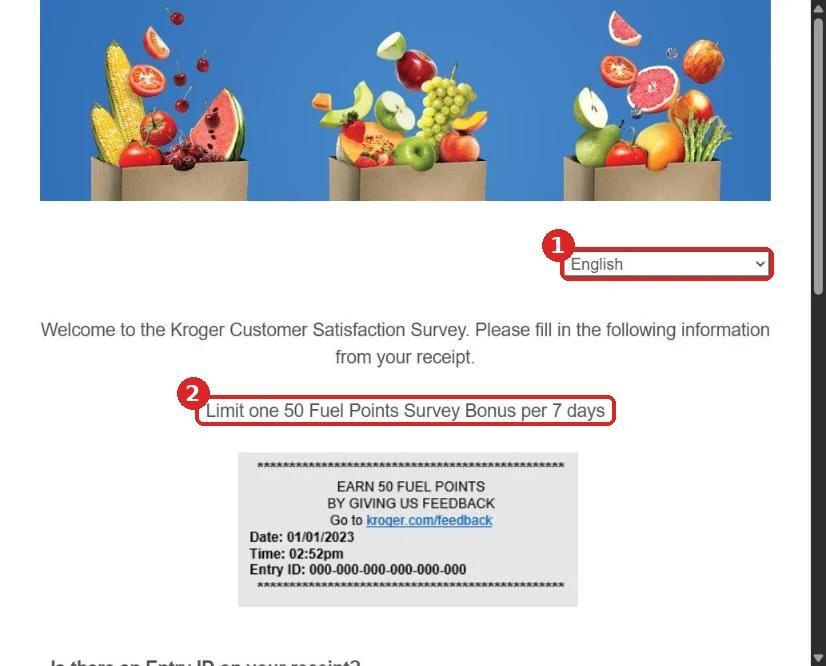
The grey box on this screen is a sample receipt. It shows you where to find the date, time and Entry ID on your own receipt.
Step 2: Tell the Survey Whether Your Receipt Has an Entry ID
Scroll down to the question “Is there an Entry ID on your receipt?” There are two large buttons: Yes and No.
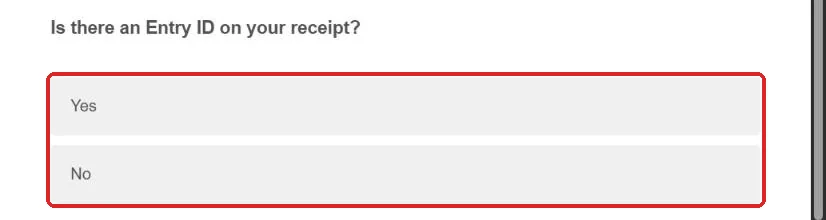
Your choice changes the fields that appear next. Most survey receipts have an Entry ID, so most people will pick Yes.
Step 3: Select Yes and Read the Accuracy Warning
Tap Yes and the button turns blue. A notice appears below it in bold.
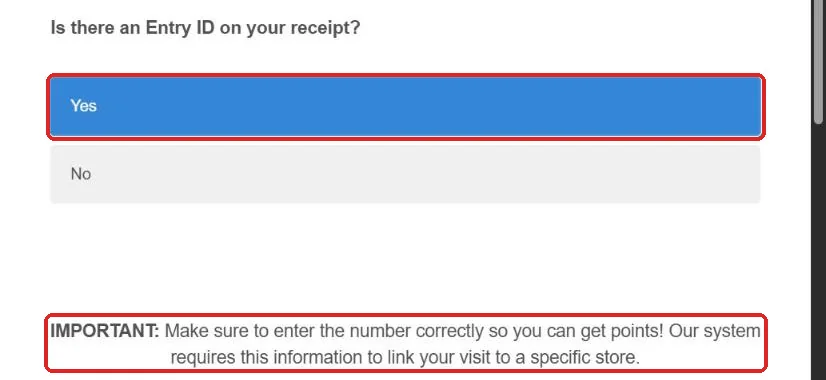
The notice says to enter the number correctly “so you can get points,” because the system needs it to link your visit to a specific store. A single wrong digit can stop the bonus.
Step 4: Enter the Entry ID in the Six Boxes
Under “Enter your Entry ID,” you’ll see six small boxes in a row. Type each group of numbers from your receipt into its own box, in order from left to right.
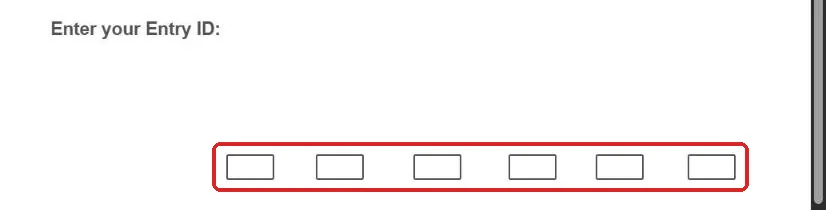
Leave out the dashes, because the boxes already separate the groups. Before moving on, check the number against your receipt one more time.
Step 5: Pick the Date and Time of Your Visit, Then Continue
Next, choose the visit date (1) from the Month, Day and Year menus. Then choose the visit time (2) from the Hour, Minute and AM/PM menus.
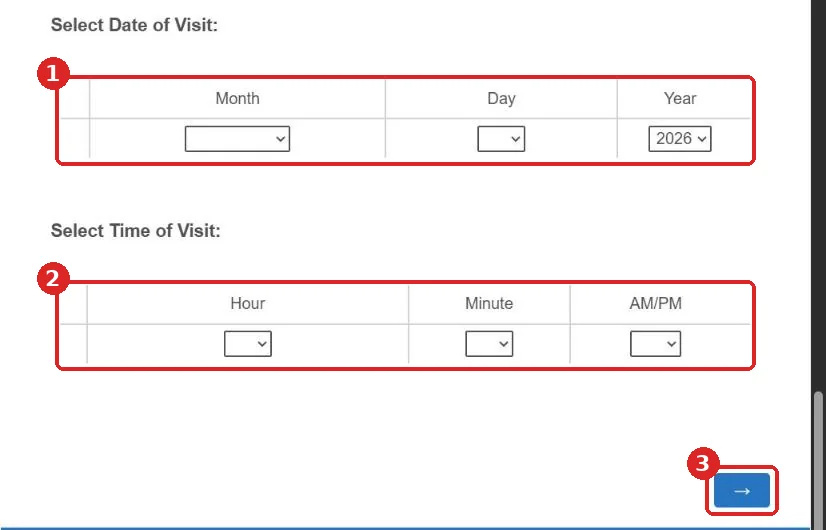
Copy both straight from your receipt. Then press the blue arrow button (3) in the bottom-right corner to go to the next page.
Step 6: Answer the Questions About Your Visit
Once your receipt details are accepted, the survey moves on to questions about your trip. Answer based on that one visit, not on Kroger in general.
Kroger doesn’t publish the full question list, and it may change over time. The next section covers what to expect so nothing catches you off guard.
Step 7: Finish the Survey and Claim Your Bonus
Keep going until you reach the final page. Follow any on-screen instructions about your bonus, and don’t close the tab before the survey says you’re done.
Keep your receipt for a few weeks afterward. If the points don’t appear, you’ll need the receipt details when you contact Kroger.
What If Your Receipt Doesn’t Have an Entry ID?
You can still take the survey. Choose No when the form asks whether there’s an Entry ID on your receipt.
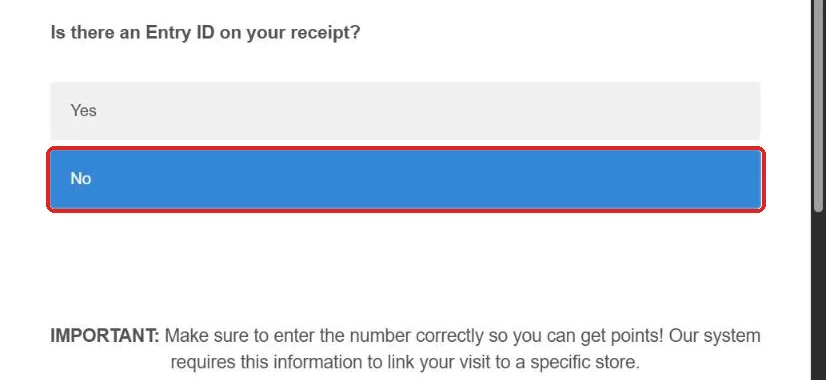
The form then asks for the store phone number instead of the Entry ID. It says this number is “found at the top of your receipt.”
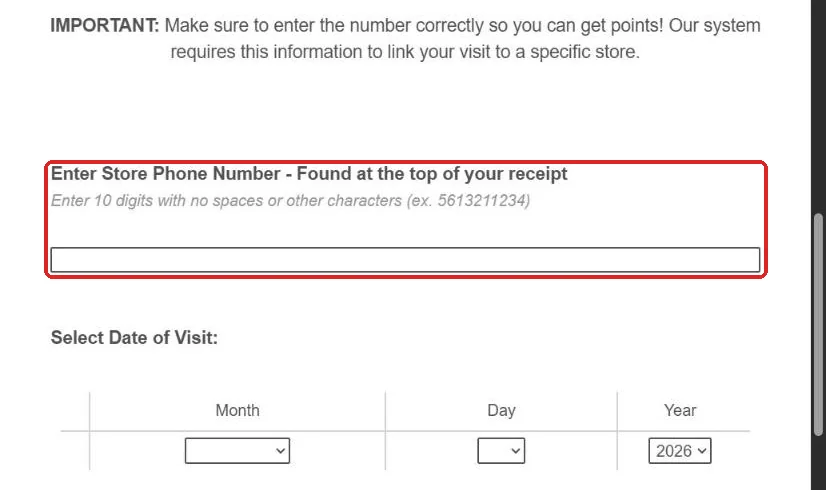
Enter all 10 digits with no spaces or other characters. The form’s own example is 5613211234. Then fill in the date and time of your visit exactly as in Step 5.
Make sure you use the store’s phone number from the top of the receipt. Don’t use your own phone number or the 1-800 customer service line.
Can You Take the Kroger Survey in Spanish?
Yes. Pick Español (América Latina) from the language menu at the top of the first page. The whole form switches to Spanish right away.
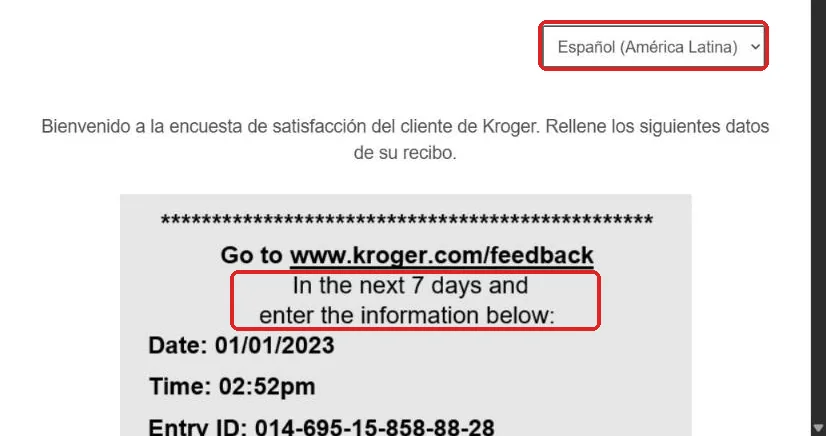
The fields stay the same. “¿Hay una identificación de entrada en su recibo?” means “Is there an Entry ID on your receipt?” The no-Entry-ID option asks for “el número de teléfono de la tienda,” the store phone number.
You can switch languages at any time using the same menu. Your receipt details are the same whichever language you pick.
What Questions Does the Kroger Survey Ask?
We could only check the survey’s opening page, because going further needs a real, unused receipt. So here’s what we can say for sure, and what’s reasonable to expect.
The first page only asks for receipt details: the Entry ID (or store phone number), the date and the time. After that, the questions are about the specific visit you entered.
Store satisfaction surveys like this one usually ask you to rate things such as:
- Your overall satisfaction with the visit
- How easy it was to find what you wanted
- Whether items were in stock
- Checkout speed and the friendliness of the staff
- Store cleanliness
- Pharmacy service, if you used it
- Whether you’d recommend the store
Most of these surveys also end with a comment box. This is the best place to mention a specific employee, department or problem, because managers can act on details.
What Should You Write in the Comment Box?
Good comments are short, specific and fair. Say what happened, where in the store it happened, and roughly what time, so the store can actually do something about it.
Here are a few examples of helpful comments:
- “The self-checkout area had only two machines working around 5 p.m., and the line was long.”
- “Maria in the deli was patient and helped me pick the right cheese for a party tray.”
- “The organic milk was out of stock again this week. It’s the third time this month.”
Skip personal details like your phone number or address in the comment box unless the survey asks for them. Your receipt details already tell Kroger which visit you mean.
How Long Does the Survey Take?
The receipt page takes about a minute once you have your receipt ready. The rest depends on how many questions you get and how much you write in the comment box.
Customer satisfaction surveys like this are designed to be short. Plan for a few minutes, and do it in one sitting so the page doesn’t time out.
How Do the 50 Bonus Points Work Now?
The survey bonus is 50 points. Your receipt and the survey page may still call them “Fuel Points,” but Kroger changed the name of its rewards in 2026.
Are Fuel Points and Kroger Points the Same Thing?
Yes. In a press release dated June 25, 2026, Kroger announced that “Fuel Points” are now simply “Points.” The change lets members choose whether to save on fuel or on groceries.
So “50 Fuel Points” on your receipt and “50 Points” in your account are the same reward. The survey page hadn’t updated its wording when we checked in October 2026.
What Are 50 Points Worth?
On their own, 50 points won’t unlock a discount, because rewards are redeemed in blocks of 100. Combined with your normal shopping points, though, they get you to the next reward faster.
| Use | Value per 100 Points | Limit |
|---|---|---|
| Fuel | 10¢ off per gallon | Up to $1 off per gallon; Kroger’s FAQ lists up to 35 gallons per fill-up, which can vary by location |
| Groceries | $1 off | Up to 1,000 Points ($10 off) per day, per household |
According to Kroger’s points FAQ, you can also split your points between fuel and groceries. Your shopping earns the base points: 1 point for every $1 spent on most groceries.
Where Can You Use Points for Fuel?
You can redeem them at Kroger Family fuel centers and at participating partner stations. Kroger’s FAQ names Shell, bp, Amoco and Turkey Hill, along with other local partners that vary by region.
At the pump, enter your Alt ID (your phone number) or scan your Rewards card. You can also use the “Use at the pump” option in the Kroger Pay app.
How Often Can You Earn the Survey Bonus?
The survey page states a limit of one 50-point survey bonus per 7 days. If you take several surveys in the same week, only one bonus counts.
That makes about four or five bonuses a month at most if you shop every week. There’s no point in saving up receipts to do several at once.
How Do You Check Your Points Balance?
Sign in to your digital account at Kroger.com or in the Kroger app. Kroger says this is where members can view their points balance and redeem rewards.
Checking a few days after the survey is a good habit. It shows whether the bonus arrived and how close you are to the next 100-point reward.
Do Kroger Boost Members Get Double Survey Points?
Kroger says Boost members earn 2X Points on their purchases. That benefit applies to purchase points, and Kroger’s terms list several exclusions.
We found nothing saying the survey bonus itself is doubled. Expect the standard 50 points from the survey unless Kroger states otherwise.
When Do Kroger Points Expire?
Points expire on the last day of the month after you earn them. For example, Kroger’s FAQ says points earned in March expire on April 30.
Survey points follow the same rule as the rest of your balance. Plan to use them within about a month so they don’t go to waste.
Why Is the Kroger Feedback Survey Not Working?
Most survey problems come down to a few causes: the wrong web address, a mistyped number, or an old receipt. Here’s how to fix each one.
The Survey Page Won’t Load
If you typed krogerfeedback.com, that’s probably the problem. The old address didn’t load when we tested it, so use kroger.com/feedback instead.
If the right address still won’t open, try another browser or turn off any ad blocker for the page. The form needs JavaScript to load, so a strict privacy setting can show a blank screen.
The Survey Won’t Accept Your Entry ID
Check each of the six groups against the receipt. Common mix-ups include 0 and 8, 1 and 7, and 3 and 8, especially on faded thermal paper.
Make sure the date and time match the receipt too. If the Entry ID still fails, select “No” and use the store phone number instead.
Your Receipt Is Too Old
Kroger’s sample receipt mentions a 7-day window. If you shopped longer ago than that, the survey may not accept your visit.
Next time, take the survey the same day or within a few days. A quick photo of the receipt is a good backup in case the paper fades.
The Bonus Points Didn’t Show Up
First, check that you haven’t already earned a survey bonus in the last 7 days. A second survey in the same week won’t add another bonus.
Next, make sure you used your Rewards card or Alt ID on that purchase. If both look right and the points still haven’t appeared after a reasonable wait, contact Kroger with your receipt handy.
We couldn’t confirm an official timeline for when survey points post, so we won’t guess one here.
Does the Survey Work for Other Kroger Family Stores?
The Kroger Co. runs many grocery brands across the U.S. These include Ralphs, Fred Meyer, King Soopers, Fry’s, Smith’s, Dillons, QFC, Mariano’s, Pick ‘n Save and Harris Teeter.
We haven’t confirmed that every brand prints the same survey link. Some brands may print a different address or no survey at all. The safest rule is to use whatever link is printed on your own receipt.
If your receipt from a sister store sends you to kroger.com/feedback, the steps in this guide apply in the same way.
Does the Survey Cover Pickup and Delivery Orders?
The survey’s title is “Kroger Feedback—In Store or Pharmacy,” which suggests it’s built for in-person visits. We found no option for Pickup or Delivery orders on the first page.
If you have feedback about an online order, Kroger’s customer service contact form is the better route. Contact details are below.
How Can You Contact Kroger Customer Service?
We can’t see or change anything in your Kroger account. For missing points, account issues or store complaints, contact Kroger directly using the details from its contact page.
| Contact Method | Details |
|---|---|
| Phone | 1-800-KRO-GERS (1-800-576-4377) |
| Phone hours | Mon–Fri 7 a.m. – midnight ET; Sat–Sun 7 a.m. – 9:30 p.m. ET |
| Online form | kroger.com/hc/help/contact-us |
| The Kroger Co., Customer Relations, 1014 Vine Street, Cincinnati, OH 45202-1100 |
When you call or write, have your receipt ready. Mention the store, the date and time of your visit, and the Entry ID if you have one.
For a problem with a single store, the store phone number at the top of your receipt is often the fastest way to reach a manager.
Tips for Getting the Most From the Survey
A few small habits help you get the bonus without trouble and make your feedback count.
- Do it the same day. Your visit is fresh in your mind, and you’re well inside the 7-day window.
- Photograph your receipt. Thermal paper fades, and a photo keeps the Entry ID readable.
- Use one survey per week. Only one bonus counts every 7 days, so pick your most recent receipt.
- Be specific in comments. “Aisle 7 had no bread at 6 p.m.” helps more than “out of stock.”
- Name staff who helped you. Positive comments about employees often reach their managers.
- Only use kroger.com/feedback. Skip links from texts, emails or ads.
Common Questions About the Kroger Feedback Survey
Is the Kroger feedback survey legit?
Yes, as long as you reach it through kroger.com/feedback. That address is printed on Kroger receipts and opens Kroger’s official form on Qualtrics.
How often can you take the Kroger survey?
You can take it whenever you have a valid receipt. The 50-point bonus is limited to one per 7 days, as stated on the survey page.
Can you take the Kroger survey without a receipt?
No. The form needs the Entry ID or the store phone number, plus the date and time of your visit. All of these come from the receipt.
Is there still a $5,000 Kroger survey sweepstakes?
The current survey page doesn’t mention a sweepstakes or cash prize. It only mentions the 50-point bonus. Be careful with any site promising cash for answering questions.
Do you need a Kroger account to take the survey?
You can open the survey without signing in. To use the points, though, you need a Kroger Rewards account, which is free to join at Kroger.com.
Can you use survey points at Shell gas stations?
Yes, at participating locations. Kroger’s FAQ lists Shell, bp, Amoco and Turkey Hill among its fuel partners, and these vary by region.
What does the Entry ID look like?
It’s a long number split into groups by dashes, printed near the bottom of the receipt. The survey gives you six boxes to enter it.
Can you take the survey for someone else’s receipt?
We couldn’t find a published rule on this. Since the bonus is tied to the Rewards account used on the purchase, the shopper whose card was used is the one who benefits.
Why does the survey still say Fuel Points?
Kroger renamed Fuel Points to Points in June 2026, but the survey page still used the old wording in October 2026. Both names mean the same reward.
Everything About the Kroger Survey in One Place
Each guide below goes deeper into one topic. Start with the one that matches your question.
Kroger Points Explained
How points are earned, what 100 points are worth, and when they expire.
Read guide →Where to Use Fuel Points
Kroger fuel centers, Shell and other partner stations, and the pump steps.
Read guide →Rewards Sign-Up and Alt ID
Join free, set up a 10-digit Alt ID, and fix common sign-up errors.
Read guide →Survey Scam Texts
How to tell a fake Kroger survey from the real one, and how to report it.
Read guide →Kroger Family of Companies
Ralphs, Fred Meyer, King Soopers and every other Kroger store brand.
Read guide →Why Trust KrogerFeedbacks.us?
We are a small, independent team that writes plain-English guides to store surveys. Our goal is simple: help you finish the survey and get the reward without confusion.
Checked at the Source
Facts come from Kroger’s survey form, Rewards FAQ, and press releases, not from other blogs.
Updated Regularly
When Kroger changes its program, like the 2026 Points rename, we update our guides.
Clear About Who We Are
We are not Kroger. We never ask for your account login, card numbers, or personal data.
Last reviewed: October 23, 2026 · About Us · Contact · Disclaimer · Privacy Policy
Kroger and related names are trademarks of The Kroger Co., used here only to describe the survey. This site is not affiliated with or endorsed by The Kroger Co.