
Last reviewed: October 23, 2026. Refund rules come from Kroger’s “Our Fresh & Quality Guarantees” page and its Digital Account FAQs.
If you shop with a Kroger Rewards card or Alt ID, your purchases are saved to your account’s Purchase History, also called My Purchases. That’s the first place to look when a paper receipt goes missing.
Purchase History is also where you request refunds on Pickup and Delivery orders. Kroger’s Fresh Guarantee covers produce and its own brands, and refunds take 5 to 7 business days once they’re confirmed.
This guide explains what’s on a Kroger receipt, how to find past purchases, and how to get a refund or replacement, with or without the paper copy.
What’s printed on a Kroger receipt?
A Kroger receipt does more than list prices. Several parts of it are useful later, so it’s worth knowing where to look.
| Part of the receipt | Why it matters |
|---|---|
| Store name, address and phone number (top) | The store phone is used in the survey if there’s no Entry ID, and it’s the quickest way to reach that store |
| Item list and prices | Needed for price adjustments and refunds |
| Rewards savings and points lines | Show the purchase was linked to your Rewards account |
| Points balance | Kroger’s Points FAQ says you can check your balance “on your receipt after each purchase” |
| Survey invitation (bottom) | The date, time and Entry ID for the 50-point feedback survey |
The survey section sits between two rows of asterisks near the bottom. It reads “Earn 50 Fuel Points by giving us feedback” and points to kroger.com/feedback.
The sample receipt on the Spanish version of the survey says to visit “in the next 7 days.” Our Kroger feedback survey guide walks through the survey with screenshots.
How do you find a lost Kroger receipt?
Start with Purchase History in your digital account. It’s at kroger.com/mypurchases and in the Kroger app, and you need to sign in to see it.
For a purchase to show up there, your Rewards card or Alt ID has to have been used at checkout. A cash purchase without your card isn’t tied to your account, so it won’t appear.
Kroger’s account FAQ treats purchase history as part of your card account. It says purchase history stays on file even if you delete your digital account, and you can reach it through Customer Service or the in-store desk.
Steps to check Purchase History
- Sign in at Kroger.com or open the Kroger app.
- Go to My Purchases, also labeled Purchase History.
- Find the trip or order by date.
- Open Order Details to see the items.
Kroger’s guarantee page uses the labels “Purchase History,” “Order Details” and “Request a Refund,” so you’ll see those names along the way.
We couldn’t view a signed-in account while writing this, so the exact layout may differ. If you can’t find a trip, Kroger Customer Service can look it up.
If the purchase isn’t in your account
There are two common reasons. Your card or Alt ID wasn’t given at checkout, or it was linked to a different account, perhaps an old email or a family member’s.
Call Kroger at 1-800-KRO-GERS (1-800-576-4377) with the store, date, approximate time and payment method. Our Kroger customer service guide has hours and other contact options.
Kroger doesn’t publish a set procedure for reprinting an in-store receipt. The store’s customer service desk is the place to ask, since it can see that store’s transactions.
How do you get a refund at Kroger?
Kroger’s “Our Fresh & Quality Guarantees” page promises: “If you don’t love an item, we’ll make it right with a replacement or refund.”
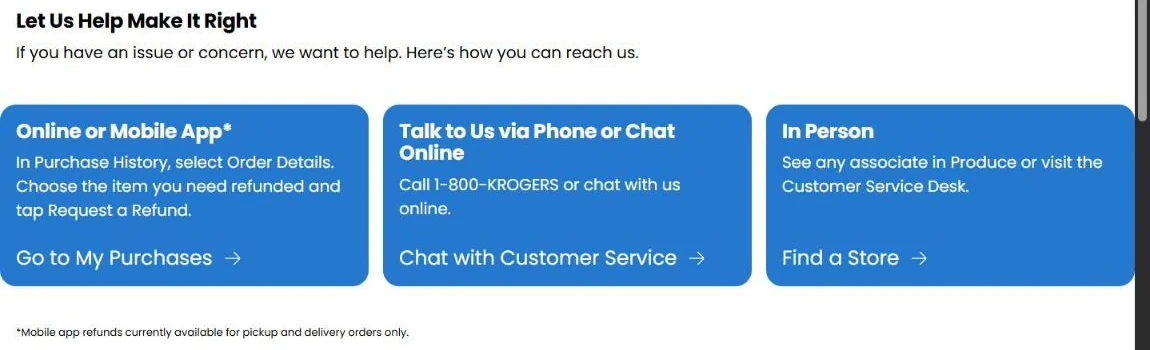
The page lists three ways to ask for one. Which works best depends on how you bought the item.
| How you bought it | How to request a refund | Where the money goes |
|---|---|---|
| Pickup order | Purchase History, then Request a Refund on the item; or call 1-800-576-4377 | Original payment method (except EBT and gift cards) |
| Delivery order | Purchase History, then Request a Refund on the item | Original payment method (except EBT and gift cards) |
| In store, wanting a replacement | Bring the item back to the store | You get a replacement item |
| In store, wanting money back on your card | Go to the store | Original payment method |
| In store, through phone or chat | Call 1-800-576-4377 or use live chat | A credit on your Kroger Plus card for your next purchase |
Refunds on Pickup and Delivery orders
This is the simplest case. In Purchase History, find the order, select the item and choose Request a Refund. Kroger says the app currently handles refunds “for pickup and delivery orders only.”
For a Pickup order, you can also call 1-800-KROGERS to speak to a live representative.
Refunds on in-store purchases
In-store purchases follow different rules. For a replacement, Kroger says to bring the item back to your store and they’ll replace it.
For a refund, there are two paths, and they don’t end in the same place:
- At the store: Kroger says “monetary refunds cannot be issued online,” so go in person if you want the money back on your original card.
- By phone or live chat: You’ll receive “a credit on your Kroger Plus card that can be used towards your next purchase,” not cash back to your bank card.
If you’d rather have the money back than a store credit, take the item and your receipt to the customer service desk.
What does the Fresh Guarantee cover?
Kroger’s FAQ describes two situations: a freshness problem with produce, or a Kroger Brand, Simple Truth or Private Selection item that “didn’t meet your expectations.”
For produce problems in person, the guarantee page says to “see any associate in Produce or visit the Customer Service Desk.”
Kroger’s page doesn’t spell out a full return policy for other brands or general merchandise. For those, ask at the store’s customer service desk.
Which refund route should you pick?
The right route depends on what you want back. Here are a few everyday situations and the option that fits each one.
| Situation | Best route | Why |
|---|---|---|
| Strawberries from a Delivery order were moldy | Purchase History, Request a Refund | Online refunds work for Delivery orders and go to your payment method |
| A Private Selection item from the store tasted off, and you want another one | Take it back to the store | Kroger says the store will replace it |
| A Simple Truth item from the store disappointed you, and you want money back on your card | Go to the store’s customer service desk | Phone and chat refunds for in-store items come as a card credit, not money back |
| A sale price didn’t ring up | Live chat or 1-800-KROGERS | Kroger says price adjustments can’t be done online |
| An item in an EBT-paid online order was bad | Call 1-800-KROGERS | Online EBT refunds aren’t available |
What to have ready before you ask
- The order number for online orders, or the receipt for in-store purchases
- The item name and price
- What was wrong with it, in a sentence
- A photo, if the problem is visible, like spoiled produce
- Your Rewards card number or Alt ID
Kroger’s guarantee page doesn’t say photos are required. They do help you explain the problem quickly, especially in live chat.
How long does a Kroger refund take?
Kroger says that once your refund is confirmed, “it will take 5-7 business days to receive the refund via your payment method.”
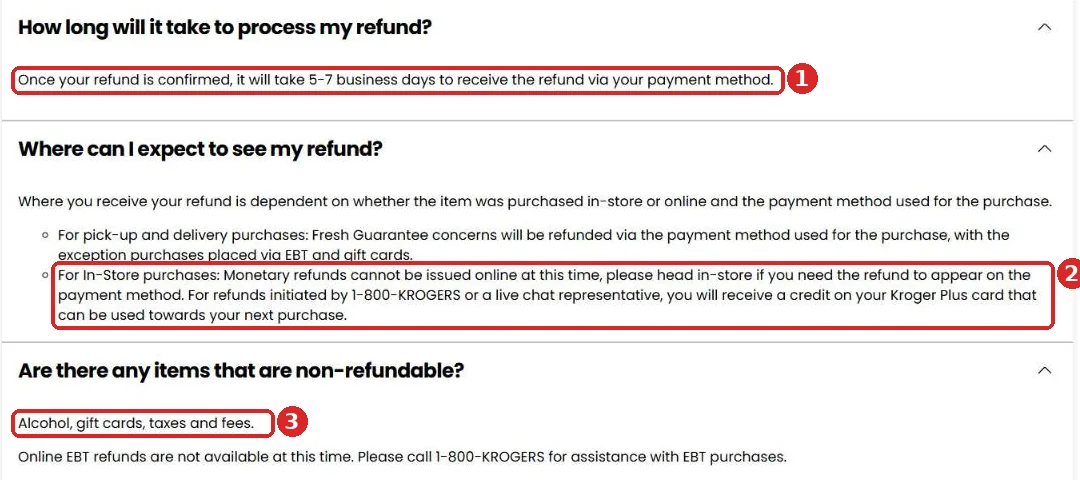
Business days don’t include weekends or holidays. A refund confirmed on a Friday could take until the next Friday, or as late as the Tuesday after that.
Your bank can add its own processing time on top. If a week and a half passes with nothing, call Kroger with the order details.
Which items can’t be refunded?
Kroger’s guarantee page lists the non-refundable items plainly: alcohol, gift cards, taxes and fees.
EBT purchases have their own limit. Kroger says “online EBT refunds are not available at this time” and asks EBT shoppers to call 1-800-KROGERS for help.
The same page notes that Pickup and Delivery refunds go back to the original payment method, except for purchases paid with EBT or gift cards.
What if you were charged the wrong sale price?
It happens: you see a sale tag, but the receipt shows the regular price. Kroger’s FAQ covers this case.
“Price adjustment refunds cannot be processed online,” Kroger says. You need to contact a live chat representative through the Contact Us page or call 1-800-KROGERS.
Have the receipt ready, along with the item name and the sale price you expected. If you catch it before leaving, the store’s customer service desk can usually check the price on the spot.
Why keep your Kroger receipts?
Purchase History covers most needs, but the paper receipt still matters in a few cases.
- The feedback survey. It needs the Entry ID or store phone number, plus the date and time, all from the receipt.
- Purchases without your card. These aren’t in Purchase History, so the paper copy may be your only record.
- In-store refunds to your card. The desk will want to match the item to a transaction.
- Points questions. The receipt shows the points earned and your balance after the trip.
Kroger receipts are printed on thermal paper, which fades over time, especially in a hot car. Snap a photo of any receipt you might need later.
How long should you keep them?
Kroger doesn’t publish a deadline for keeping receipts. For the survey, the sample receipt suggests a 7-day window.
For refunds and points questions, keeping receipts for a month or two is a sensible habit. That’s about how long points last before they expire.
Paper receipt or Purchase History: which do you need?
Both have their uses. This quick comparison shows when each one helps.
| Task | Paper receipt | Purchase History |
|---|---|---|
| Take the 50-point survey | Needed (Entry ID or store phone, date, time) | Not described by Kroger as an option |
| Refund on a Pickup or Delivery order | Not needed | Request a Refund on the item |
| Replacement for an in-store item | Helpful to bring | Shows the purchase if your card was used |
| Record of a cash purchase without your card | Only record | Won’t show it |
| Check points earned on a trip | Shows points and balance | Shows your account balance |
The simplest habit is to always use your card or Alt ID, and keep paper receipts for a few weeks. That covers almost every situation.
Receipts and your points
Each receipt shows how many points the trip earned and your current balance. If the numbers look off, check which items don’t earn.
Kroger’s fuel points page says items like adult beverages and tobacco don’t earn points. Gift cards earn double on most brands but nothing on some. Our Kroger Points guide lists the full rules.
If the receipt shows no points earned at all, your card or Alt ID probably wasn’t used. Set up an Alt ID so this doesn’t happen again; our Kroger Rewards sign-up guide shows how.
Watch out for fake receipt and refund scams
Some websites offer to create fake store receipts. Using a fake receipt for a refund or survey is fraud. The survey form itself says it uses receipt details to “link your visit to a specific store.”
Be equally careful with messages offering a refund you didn’t ask for. Kroger’s refund routes are Purchase History, live chat, 1-800-576-4377 or the store, never a link in a random text. Our guide to Kroger survey scams covers the warning signs.
Common questions about Kroger receipts
Can I return something to Kroger without a receipt?
Kroger’s guarantee page doesn’t mention a receipt requirement for in-store replacements. If you used your card or Alt ID, the purchase is in your history, which helps. Ask at the customer service desk.
Where do I see my past Kroger purchases?
Sign in at Kroger.com or the Kroger app and open My Purchases, also called Purchase History.
Can I get a refund on a Kroger delivery order in the app?
Yes. Open Purchase History, find the order, select the item and choose Request a Refund.
Why did my refund come as a Kroger Plus card credit?
Refunds for in-store purchases that you request by phone or chat are issued as a credit on your Kroger Plus card. To get money back on your payment card, go to the store.
Can I get a refund on alcohol or gift cards?
No. Kroger lists alcohol, gift cards, taxes and fees as non-refundable.
How long does a Kroger refund take?
Kroger says 5 to 7 business days after the refund is confirmed.
KrogerFeedbacks.us is an independent guide and is not affiliated with The Kroger Co. Refund rules can change; check Kroger’s Fresh & Quality Guarantees page for the latest terms.